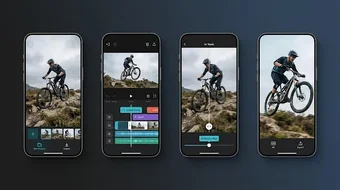
Alight Motion AI Editor, an AI planning workspace for short clips
Structures scene pacing, drafts captions, and organizes clip sequences for short-form projects in a planning-first workflow, not final production. Created by ALWAYS WIN APPS as an Android utilities tool, the app uses AI prompts for concept ideas and visual style suggestions, and presents a simple, project-focused layout aimed at social creators. It suits influencers and hobbyists who need help shaping Reels, Stories, or TikToks before moving into a full editor.
What the app does for short-form project planning
Alight concentrates on the pre-edit stage: it generates AI-assisted prompt ideas for video concepts, offers caption and title drafting tailored to short-form content, and provides clip-flow organization for reels and stories. The listing notes visual style suggestions and scene pacing support, so the app frames an edit as a sequence of planned beats rather than performing timeline-based cutting or final rendering.
How it fits into a creator workflow and its accessibility
The app targets social media creators and hobbyists, and its description highlights a simple, project-focused layout designed to avoid a crowded workspace. This implies a lower learning curve for concept work; the developer positions the tool as a lightweight alternative to heavier editors, appropriate for users who want structured planning instead of detailed, technical assembly.
Safety, affiliation, and distribution details creators should note
The listing clarifies the product is independent from the official Alight Motion and is not affiliated with Alight Creative, Inc. The app is available on Android devices requiring Android 7.0 or later and is distributed via the Play Store and APK repositories. The store listing also indicates the app may include advertisements and third-party analytics.
Scope limits and where advanced users may need other tools
According to the app's own description, it focuses on planning and refining rather than professional production, so it does not promise high-end rendering or direct platform publishing. Creators who need timeline precision, final compositing, or export features should move projects into a dedicated editing suite after using the app for concept work.
Clear planning tool for short-form creators, not a production editor
Alight serves as a focused idea-and-structure companion for creators who want AI prompts, caption drafting, and clip sequencing before committing to a final edit. Its Android requirement and independent status are explicit, and its niche purpose keeps the interface compact. Recommended.